|
|
|
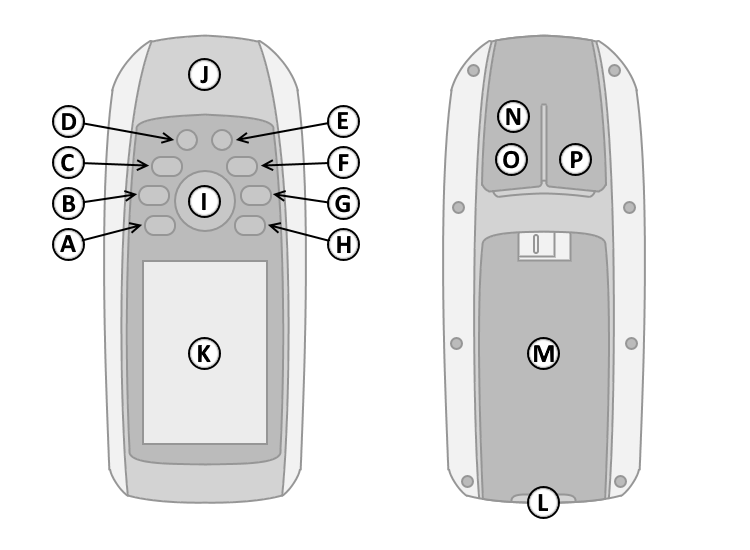
| A. | QUIT |
| B. | POWER |
| C. | FIND (MOB) |
| D. | IN (+) |
| E. | OUT (-) |
| F. | PAGE |
| G. | MENU |
| H. | ENTER (MARK) |
| I. | D-PAD |
| J. | GPS Antenna (Patch) |
| K. | Color Display |
| L. | Lanyard Attachment |
| M. | Battery Cover |
| N. | MCX Connector |
| O. | Mini-USB Connector |
| P. | Serial Port Connector |
|
|
|
| A. | QUIT |
| B. | POWER |
| C. | FIND (MOB) |
| D. | IN (+) |
| E. | OUT (-) |
| F. | PAGE |
| G. | MENU |
| H. | ENTER (MARK) |
| I. | D-PAD |
| J. | GPS Antenna (Patch) |
| K. | Color Display |
| L. | Lanyard Attachment |
| M. | Battery Cover |
| N. | MCX Connector |
| O. | Mini-USB Connector |
| P. | Serial Port Connector |
| A. QUIT Button | F. PAGE Button | |
| 1. Select to cancel or return to the previous menu or page. | 1. Press and release to loop through display pages. | |
| 2. Press and release to loop through display pages in reverse order. | G. MENU Button | |
| B. POWER Button | 1. Press and release to open the options menu for the currently active page. | |
| 1. Press and hold to turn unit on/off. | 2. Press and release twice to open the main menu (from any page). | |
| 2. Press and release to open Status Page. | H. ENTER Button | |
| C. FIND Button | 1. Press and release to make menu selections and/or acknowledge | |
| 1. Select to open the search menu. | messages. | |
| 2. Press and hold to activate MOB page. | 2. Press and hold to save current location as a waypoint. | |
| D. IN Button | I. D-PAD Button | |
| 1. Select to zoom in on the map. | 1. Press up, down, left or right to navigate menu selections, pan the map, | |
| E. OUT Button | or move the arrow/cursor. | |
| 1. Select to zoom out on the map. |
 |
 |
 |
 |
 |
|
 |
||||
|---|---|---|---|---|---|---|---|---|---|---|
| === |
=== |
=== |
=== |
=== |
||||||
 |
 |
 |
 |
 |
|
 |
||||
|
|
||||||||||
 |
 |
 |
 |
 |
 |
|||||
 |
 |
 |
 |
 |
 |
|||||
 |
 |
 |
 |
 |
||||||